Mandarin
See the tone you actually said.
Record a word. Your pitch is drawn over the native shape, moment by moment.
Tone is the part of Mandarin you cannot check by reading. Tone Check draws what you did against what the word needs, and tells you which part drifted.
Included with Pro · See plans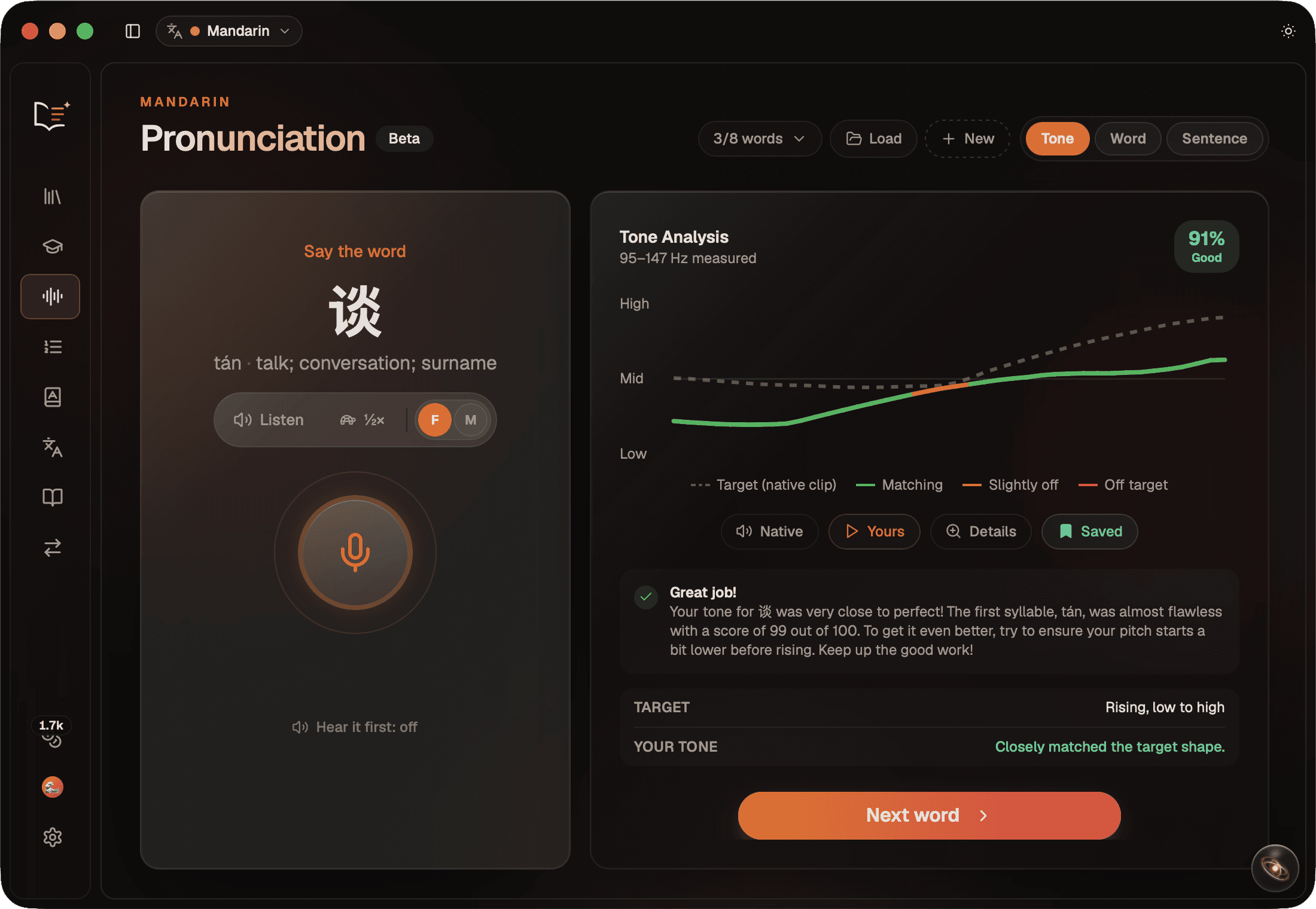
The chart
Two lines, one honest comparison.
The dashed line is the target. Where a native clip for that exact word can be trusted, the dashed line is that clip's own measured pitch rather than a textbook curve.
Your line, coloured as you go
Green where you are matching, orange where you are slightly off, red where the pitch left the target. Segment by segment, not one verdict for the whole word.
A fixed scale, on purpose
The axis does not stretch to fit your recording. A flat attempt looks flat, which is the whole point of looking at it.
Measured against your own voice
Pitch is read in semitones relative to your own median, so a low voice and a high voice are scored the same way. Everyone's natural range is different.
The real Hz you produced
Every result shows the pitch range that recording actually covered, so you can see when a take was simply too flat to judge.
The four tones
Named the way you would say them.
Each attempt is broken into syllables and matched against the shape that syllable is supposed to have.
Tone 1
High and level
Tone 2
Rising, low to high
Tone 3
Dips low, then rises
Tone 4
Falling, high to low
Third tone sandhi is applied before scoring, and the half third tone counts as correct, because that is what fluent connected speech actually does.
Detail view
Slow it down until you can hear it.
Open any word and play both takes together at half or quarter speed, pitch preserved, with a slider that fades from your voice to the native speaker's while it plays.
Callouts where it happened
Notes appear at the moment they apply, not in a list afterward.
Your line, drawn as it plays
A playhead reveals your pitch in time with the audio, so a late rise looks late.
Either native voice
Male, female, or off. Match whichever one sits closer to your range.
Real notes from the app
On your machine
Your voice never leaves the app.
Pitch tracking, syllable splitting and scoring all run locally. The only thing that ever goes out is the finished numbers, sent to phrase them into a sentence, and even that falls back to a local message when you are offline.
A session
Ten words from your own reading.
Practice words you saved while reading, not a stock list. Keep a good take on any word and it comes back with the chart and the score intact.
Your study words
Drawn from what you saved, including words you already know.
Save your best attempt
Reopening a save restores the whole result, offline.
Your tones today
A summary by tone at the end, worst first, and what to work on.
What it checks
Tone, and it says so.
Tone Check measures pitch shape. It does not check your consonants, your vowels, or whether you said the right word, and it never claims to. Say a different word with a perfect tone and it will tell you the tone was good, because that is all it looked at.
Tone Check is in beta and desktop only, since it needs a microphone. The screen above shows it as it looks today.
Hear the difference, then close it.
Tone Check is part of Lexxio Pro, alongside the reader, the dictionary and Coach.
Be first through the door.
Join the waitlist and we'll email you the moment Lexxio is ready to read. Anticipated late Fall 2026.